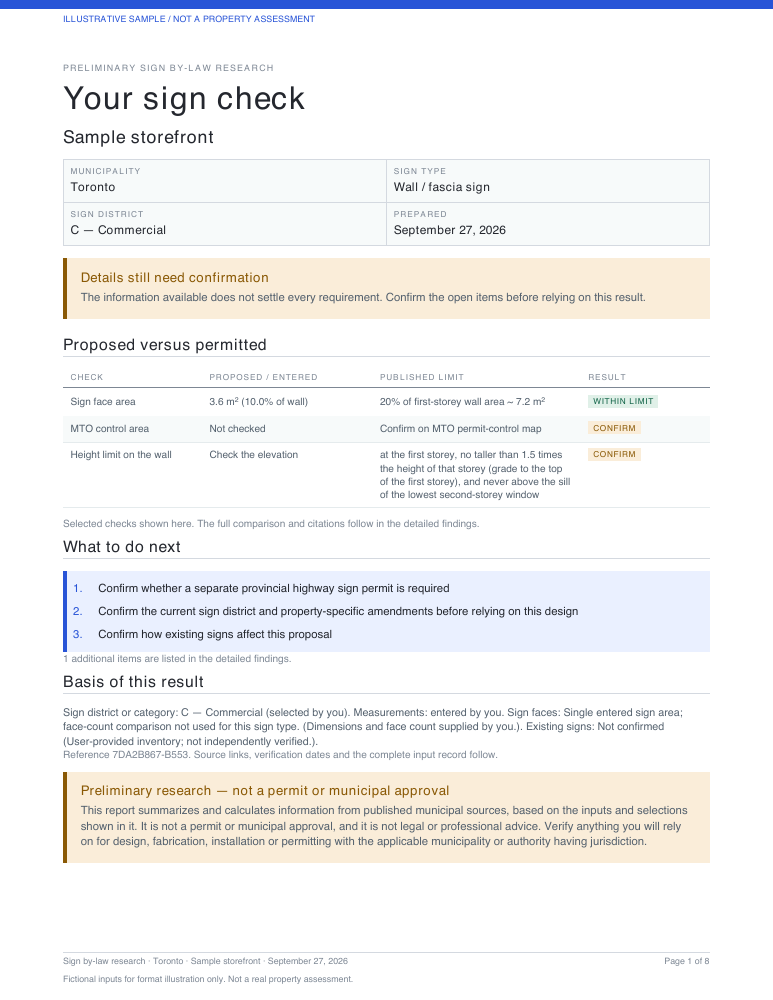
 For your project file
Full research report
Proposed dimensions, published limits, source references and the questions still to resolve.
Download full report sample PDF ↓Canadian-owned. Built around the rules here.
Understand the sign limits and what needs checking before you commit to the work.
Ontario municipalities covered
Published by-laws behind the figures
Independent research, local focus
From the location to the source document, keep the important details together.
A wall sign in Toronto and a wall sign in Mississauga can face different requirements. Start with the municipality that governs your property.
This example sign fits within the selected Commercial district’s first-storey wall-area limit. Other conditions and approvals remain to be confirmed.
| First-storey wall | 12 m wide × 3 m high = 36 m² |
|---|---|
| Applicable area limit | 20% of first-storey wall area 36 m² × 20% = 7.2 m² maximum |
| Proposed sign | 3 m wide × 1.2 m high = 3.6 m² 3.6 m² below the area limit; no other wall signs in this example. |
| Projection from wall | 0.15 m proposed / 0.6 m maximum |
| Example placement | First storey; below the lowest second-storey window sill. |
Illustrative area check using sample dimensions, not a property approval. The official minimum and component charges do not reconcile, so no fee total or range is given. Research record: Sept 2026; later amendments and property-specific conditions remain to be confirmed.
A detailed report for your team, plus an unbranded customer assessment with findings and next steps.
Preview both report PDFs →Independent preliminary research, not a municipal approval or permit. Confirm requirements with your municipality before proceeding.
See the detail behind a check and the clear assessment you can share with your customer. Both PDFs are neutral, with no SignAllow branding.
For your project fileProposed dimensions, published limits, source references and the questions still to resolve.
Download full report sample PDF ↓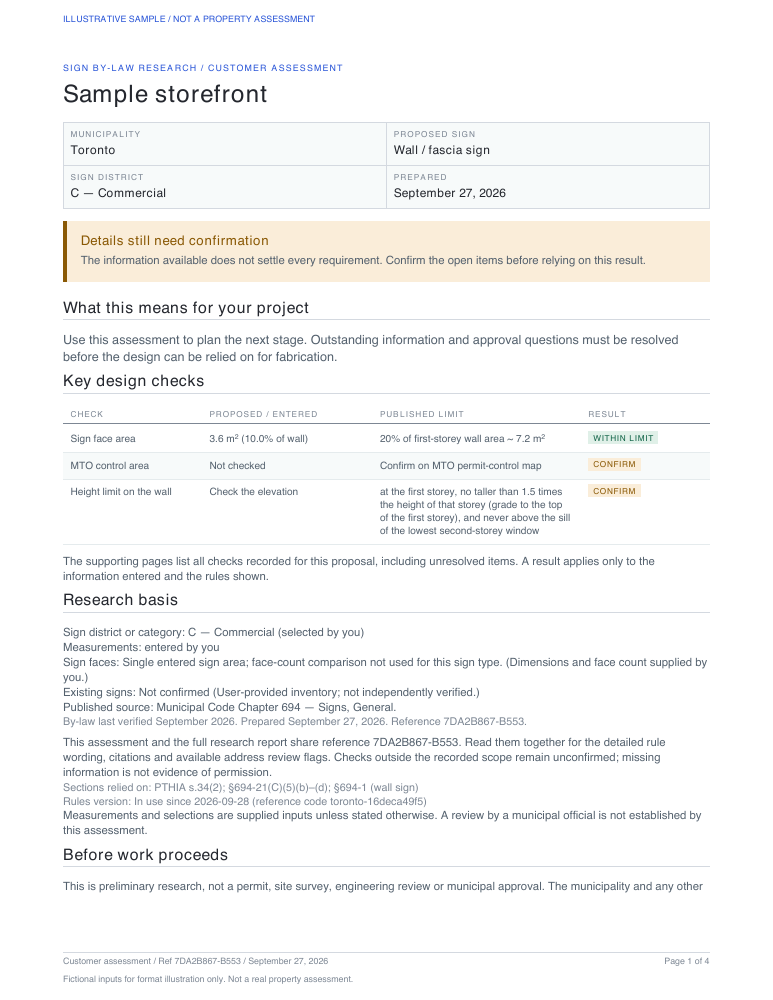 For your customer
A plain-language assessment with key design checks, risks and practical next steps.
Download customer summary PDF ↓Illustrative samples for the same fictional Toronto storefront: a wall sign with assumed measurements and district. Highway and heritage questions remain open. These show the report format, not approval for a real property.
Choose a location and sign type.
We’ll work through the details with you.
What a sign code check includes ↗What we found reading the by-laws ↗How the check works ↗
Meet Scout, SignAllow’s upcoming AI permit advisor. Ask sign-bylaw questions, explore your options, and understand what to confirm before applying.
Coming soon to Pro members only. Scout is not available yet. A launch date has not been announced.
Scout can make mistakes. Confirm important requirements against the cited sources before relying on an answer. AI guidance is not municipal approval.

Choose a plan when you need more. Prices are plus applicable taxes.
Explore the workflow before subscribing.
For one person checking up to 10 new properties a month.
For busy shops, regular high volumes or a team of up to 5.
Free checks you haven’t used stay yours when you subscribe: on Starter they’re added to the month’s 10.
Practical guides to permits, drawings and the questions to resolve before ordering.
Plan one storefront or a multi-city brand rollout: compare local questions, adapt sign standards, assign responsibilities and keep a site decision register.
Toronto sign permits for owners, sign shops, property managers and brands: sign districts, property reviews, coordinated packages and local design decisions.
Plan Mississauga signs around occupancy, building use and special districts, with practical advice for owners, sign shops, property managers and brands.
Plan Brampton signs around plaza style, aggregate area and property categories, with guidance for owners, sign shops, property managers and brands.
Understand Ontario’s 400-metre highway sign-permit screening distance, why the right-of-way matters, and what to ask MTO before ordering a sign.
Yes. Choose the number of display faces on the one sign, then open Compare a proposed sign under Dimensions (optional). Confirm equal sizes or enter each face separately, up to four faces. Dimensions can remain unknown. The result distinguishes the largest face from the combined physical area and compares recorded per-face and combined limits where supported. Unverified counting methods, more than four faces and property-specific conditions need confirmation. Faces do not count as separate signs, and billable area for permit fees is not assumed.
Yes. An active Starter account holder can choose Add 5 checks — $29 CAD in Account or the low-allowance notice. It is a one-time purchase plus applicable tax, with no automatic top-ups. Monthly and unused free checks are used first. Purchased checks have no expiry and remain usable after cancellation, but do not extend membership, add seats or unlock membership-only features. Pro keeps purchased credits unused. Review the terms in the same-page dialog, then continue to Stripe; returning confirms your balance without running a check.
A confirmed purchase shows a payment status without running a check or using your allowance. Continue your check lets you review your inputs; Your account shows your plan and balance. If you leave checkout, your choices are restored in the same browser tab where storage is available. If payment confirmation is unavailable, use Try confirmation again. If you already paid, do not buy again: use Already paid? Get back in with your checkout email.
3 free checks. No card, no account.